# PostCSS Custom Properties [ ][PostCSS]
[
][PostCSS]
[ ][npm-url] [
 ][css-url] [
 ][cli-url] [
 ][discord]
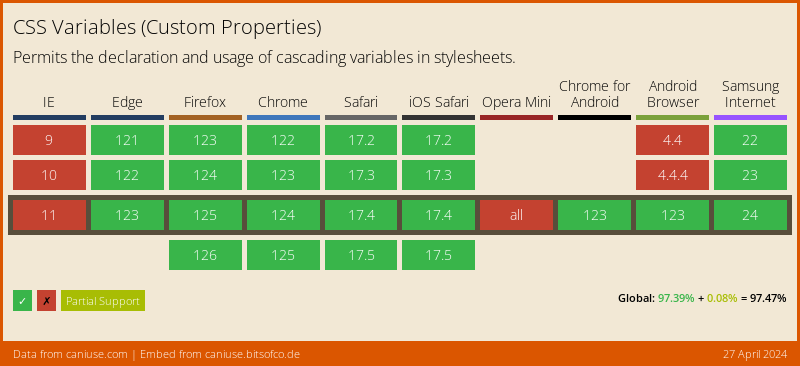
[PostCSS Custom Properties] lets you use Custom Properties in CSS, following
the [CSS Custom Properties] specification.
[](https://caniuse.com/#feat=css-variables)
```pcss
:root {
--color-blue-dark: rgb(0, 61, 184);
--color-blue-light: rgb(0, 217, 255);
--color-pink: rgb(255, 192, 211);
--text-color: var(--color-pink);
}
.element {
/* custom props */
--border-color: var(--color-blue-light);
/* props */
border: 1px solid var(--border-color);
color: var(--text-color);
}
.element--dark {
--border-color: var(--color-blue-dark);
}
/* becomes */
:root {
--color-blue-dark: rgb(0, 61, 184);
--color-blue-light: rgb(0, 217, 255);
--color-pink: rgb(255, 192, 211);
--text-color: var(--color-pink);
}
.element {
/* custom props */
--border-color: var(--color-blue-light);
/* props */
border: 1px solid rgb(0, 217, 255);
border: 1px solid var(--border-color);
color: rgb(255, 192, 211);
color: var(--text-color);
}
.element--dark {
--border-color: var(--color-blue-dark);
}
```
**Note:**
- Only processes variables that were defined in the `:root` or `html` selector.
- Locally defined variables will be used as fallbacks only within the same rule, but not elsewhere.
- Fallback values in `var()` will be used if the variable was not defined in the `:root` or `html` selector.
## Usage
Add [PostCSS Custom Properties] to your project:
```bash
npm install postcss postcss-custom-properties --save-dev
```
Use it as a [PostCSS] plugin:
```js
const postcss = require('postcss');
const postcssCustomProperties = require('postcss-custom-properties');
postcss([
postcssCustomProperties(/* pluginOptions */)
]).process(YOUR_CSS /*, processOptions */);
```
[PostCSS Custom Properties] runs in all Node environments, with special
instructions for:
- [Node](INSTALL.md#node)
- [PostCSS CLI](INSTALL.md#postcss-cli)
- [PostCSS Load Config](INSTALL.md#postcss-load-config)
- [Webpack](INSTALL.md#webpack)
- [Next.js](INSTALL.md#nextjs)
- [Gulp](INSTALL.md#gulp)
- [Grunt](INSTALL.md#grunt)
## Options
### preserve
The `preserve` option determines whether properties using
custom properties should be preserved in their original form. By default these are preserved.
Custom property declarations are always preserved only `var()` functions can be omitted.
```js
postcssCustomProperties({ preserve: false })
```
```pcss
:root {
--color-blue-dark: rgb(0, 61, 184);
--color-blue-light: rgb(0, 217, 255);
--color-pink: rgb(255, 192, 211);
--text-color: var(--color-pink);
}
.element {
/* custom props */
--border-color: var(--color-blue-light);
/* props */
border: 1px solid var(--border-color);
color: var(--text-color);
}
.element--dark {
--border-color: var(--color-blue-dark);
}
/* becomes */
:root {
--color-blue-dark: rgb(0, 61, 184);
--color-blue-light: rgb(0, 217, 255);
--color-pink: rgb(255, 192, 211);
--text-color: var(--color-pink);
}
.element {
/* custom props */
--border-color: var(--color-blue-light);
/* props */
border: 1px solid var(--border-color);
color: rgb(255, 192, 211);
}
.element--dark {
--border-color: var(--color-blue-dark);
}
```
[cli-url]: https://github.com/csstools/postcss-plugins/actions/workflows/test.yml?query=workflow/test
[css-url]: https://cssdb.org/#custom-properties
[discord]: https://discord.gg/bUadyRwkJS
[npm-url]: https://www.npmjs.com/package/postcss-custom-properties
[PostCSS]: https://github.com/postcss/postcss
[PostCSS Custom Properties]: https://github.com/csstools/postcss-plugins/tree/main/plugins/postcss-custom-properties
[CSS Custom Properties]: https://www.w3.org/TR/css-variables-1/
][discord]
[PostCSS Custom Properties] lets you use Custom Properties in CSS, following
the [CSS Custom Properties] specification.
[](https://caniuse.com/#feat=css-variables)
```pcss
:root {
--color-blue-dark: rgb(0, 61, 184);
--color-blue-light: rgb(0, 217, 255);
--color-pink: rgb(255, 192, 211);
--text-color: var(--color-pink);
}
.element {
/* custom props */
--border-color: var(--color-blue-light);
/* props */
border: 1px solid var(--border-color);
color: var(--text-color);
}
.element--dark {
--border-color: var(--color-blue-dark);
}
/* becomes */
:root {
--color-blue-dark: rgb(0, 61, 184);
--color-blue-light: rgb(0, 217, 255);
--color-pink: rgb(255, 192, 211);
--text-color: var(--color-pink);
}
.element {
/* custom props */
--border-color: var(--color-blue-light);
/* props */
border: 1px solid rgb(0, 217, 255);
border: 1px solid var(--border-color);
color: rgb(255, 192, 211);
color: var(--text-color);
}
.element--dark {
--border-color: var(--color-blue-dark);
}
```
**Note:**
- Only processes variables that were defined in the `:root` or `html` selector.
- Locally defined variables will be used as fallbacks only within the same rule, but not elsewhere.
- Fallback values in `var()` will be used if the variable was not defined in the `:root` or `html` selector.
## Usage
Add [PostCSS Custom Properties] to your project:
```bash
npm install postcss postcss-custom-properties --save-dev
```
Use it as a [PostCSS] plugin:
```js
const postcss = require('postcss');
const postcssCustomProperties = require('postcss-custom-properties');
postcss([
postcssCustomProperties(/* pluginOptions */)
]).process(YOUR_CSS /*, processOptions */);
```
[PostCSS Custom Properties] runs in all Node environments, with special
instructions for:
- [Node](INSTALL.md#node)
- [PostCSS CLI](INSTALL.md#postcss-cli)
- [PostCSS Load Config](INSTALL.md#postcss-load-config)
- [Webpack](INSTALL.md#webpack)
- [Next.js](INSTALL.md#nextjs)
- [Gulp](INSTALL.md#gulp)
- [Grunt](INSTALL.md#grunt)
## Options
### preserve
The `preserve` option determines whether properties using
custom properties should be preserved in their original form. By default these are preserved.
Custom property declarations are always preserved only `var()` functions can be omitted.
```js
postcssCustomProperties({ preserve: false })
```
```pcss
:root {
--color-blue-dark: rgb(0, 61, 184);
--color-blue-light: rgb(0, 217, 255);
--color-pink: rgb(255, 192, 211);
--text-color: var(--color-pink);
}
.element {
/* custom props */
--border-color: var(--color-blue-light);
/* props */
border: 1px solid var(--border-color);
color: var(--text-color);
}
.element--dark {
--border-color: var(--color-blue-dark);
}
/* becomes */
:root {
--color-blue-dark: rgb(0, 61, 184);
--color-blue-light: rgb(0, 217, 255);
--color-pink: rgb(255, 192, 211);
--text-color: var(--color-pink);
}
.element {
/* custom props */
--border-color: var(--color-blue-light);
/* props */
border: 1px solid var(--border-color);
color: rgb(255, 192, 211);
}
.element--dark {
--border-color: var(--color-blue-dark);
}
```
[cli-url]: https://github.com/csstools/postcss-plugins/actions/workflows/test.yml?query=workflow/test
[css-url]: https://cssdb.org/#custom-properties
[discord]: https://discord.gg/bUadyRwkJS
[npm-url]: https://www.npmjs.com/package/postcss-custom-properties
[PostCSS]: https://github.com/postcss/postcss
[PostCSS Custom Properties]: https://github.com/csstools/postcss-plugins/tree/main/plugins/postcss-custom-properties
[CSS Custom Properties]: https://www.w3.org/TR/css-variables-1/